

Review
Canva has quietly become the most dangerous design tool on the planet — dangerous because once you start using it, you can't go back to fighting with professional software. The AI Photo & Video Editor is not a gimmick; it's a genuinely functional creative suite wrapped in an interface so intuitive that your grandmother could use it. And she'd probably make something better than you.
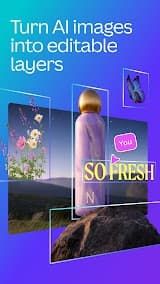
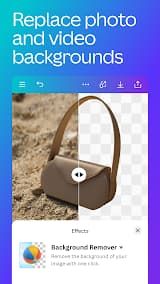
AI Photo Editing is shockingly good. The Magic Edit tool lets you add, remove, or replace objects in a photo with a text prompt. The Background Eraser works in one click. The Adjust tab lets you isolate edits to foreground or background — a feature most pro tools charge extra for. Filters adjust color, brightness, and style instantly, and the Intensity slider gives you fine control. The new Image Upscaler rescues low-res photos that would otherwise be trash. For portraits, the Face Smooth tool delivers studio-quality results without the studio price tag.
The Video Editor 2.0 is a legitimate upgrade. Multi-track editing, visual audio waveforms, AI voiceover, and Beat Sync (which auto-aligns your cuts to music) put it in the same conversation as Final Cut Pro for casual-to-intermediate work. The new Magic Video feature (iPhone only) drops in your clips and AI stitches them into a scroll-ready video with beats, effects, and text — genuinely impressive for a 30-second social reel.
Image-to-Video (AI Video Effects) turns a single static photo into a 5-second animated clip. You pick from preset effect templates — no custom prompts allowed — and the AI generates natural motion. It's perfect for social media, though the 5-second cap is limiting. The feature does not support transparent backgrounds, paid stock photos, or reliable face animation yet.
But the subscription system is a mess. Multiple users have reported being charged twice — once annually, once monthly — with no clear explanation. Customer support responds with automated templates that don't solve anything. If you're on iOS, you risk getting billed through both Canva direct and Apple, on two different cards.
Canva isn't trying to replace Photoshop or Premiere Pro. It's trying to make 90% of people never need them. And it's winning.


 Install Latest APK
 Check historical versions