How Canva Revolutionizes Modern Visual Content Creation
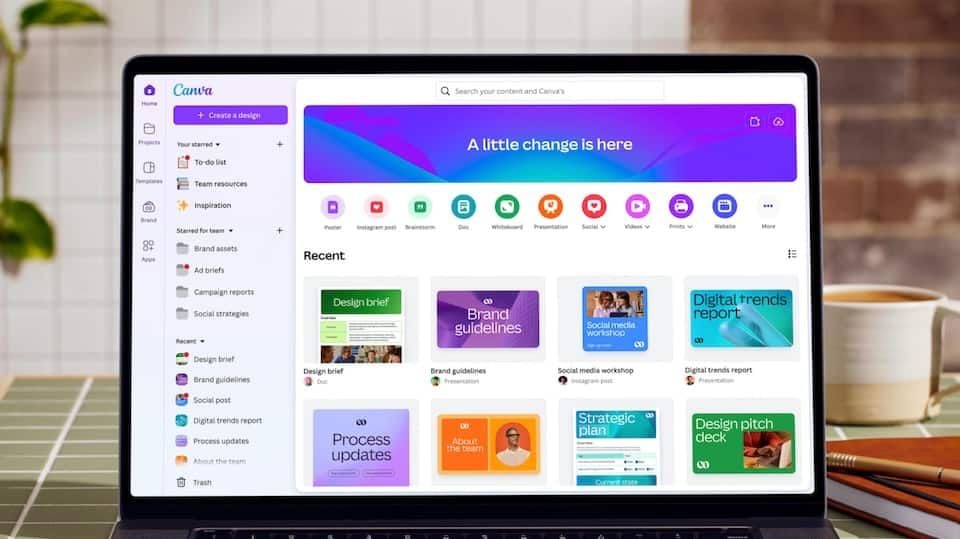
With the increase in digitalization, pictures are vital to the communication, marketing and learning experiences and consequently an important part of personal branding. But, making professional designs traditionally was a do-it-yourself effort that took advanced skills and costly software. With its user-friendly design tool, Canva has transformed the landscape, allowing designers of all skill levels to produce breathtaking visuals easily. Since its debut, Canva has quickly become a go-to platform for both students and educators, and for those in the world of entrepreneurship, marketing and the world of business.


Extensive Template Library for Every Purpose
Canva's most impressive aspect is its library of professionally designed templates, which has grown to a large size. The platform comes with templates for nearly any type of project, ranging from social media posts to presentations, resumes, flyers, brochures, newsletters, business cards, invitations and more. Users do not create a new canvas from scratch, but can choose a form that is similar to their objectives and still edit it as needed.
This feature is helpful for users to save time and get the desired results. The templates are saved in categories and industries for easy access to find a suitable design for personal, academic, and business projects. Even if someone is not a designer, he can create a decent content within several minutes.
Simple Drag-and-Drop Design Experience
Clearly, a key to the popularity of Canva is its drag-and-drop editor. An advantage of the platform is that it removes the complexity that often accompanies professional design software, and lets people manipulate and edit parts using quick mouse-dragging movements. The user just clicks and drags text, images, icons, illustrations, videos, and animations with ease to any project.
Users can play with different layouts, colours and visual effects without being technically savvy. This “flexibility” allows creativity to flourish, yet has a very short learning curve. Both the interface and the capabilities are easy to use, making them an excellent choice for those new to programming and design, yet offering customization options for more advanced users.
AI-Powered Creative Assistance
AI has recently been playing a more significant role in Canva 's ecosystem. The platform now has a range of new AI-based tools to assist users in generating content more quickly and efficiently. AI features include the ability to suggest text, like Magic Write, and produce original images from text prompts, such as those generated by AI image creation tools.
Canva also includes intelligent suggestions for design, background removal, image enhancement, and auto sizing. These feature will save further manual labor and streamline repetitive tasks. With AI technology, users can dedicate more time and efforts to creating ideas and crafting messages that resonate, given up on the time-consuming technical editing processes.
Real-Time Collaboration for Teams
Canva isn't just for one person. It also offers robust collaboration capabilities that help teams to work more efficiently. Several users can work with the same design at a time, making possible the real-time collaboration of all participants, irrespective of their location.
The platform allows for the addition of comments, feedback, and review of progress directly by team members. Canva's Brand Kit allows businesses to easily access and store logos, fonts, colors, and visual elements to ensure brand consistency and a shared workspace. The collaboration features really make Canva best suited for marketing teams, agencies, educational institutions and even growing businesses.
Advanced Multimedia Content Creation
But beyond graphic design, Canva has become a full-fledged platform for creating content. One can design videos, develop presentations, build websites, create infographics, and create interactive content all in one application, without having to switch between multiple applications.
It features animation effects, audio integration, video trimming, screen recording, and presentation modes. Canva also enables users to directly publish and schedule content for different social media platforms, streamlining the content distribution process. The multimedia features enable them to manage a variety of projects from one common interface.
Conclusion
By democratising creative tools, Canva has made them easily available, affordable and effective. With a wide range of pre-made templates, easy-to-use editing options, AI assistance, team collaboration, and multimedia features, it stands as one of the most flexible design tools available today. From individual projects to educational contexts to marketer-driven campaigns, Canva provides all the tools to create visually appealing assets with ease. Canva's continued growth in the digital communications landscape makes it to be a great choice for anyone seeking to craft any kind of great-looking and professional content without having to deal with the sophisticated design software.