Work Smarter With Zoom Workplace
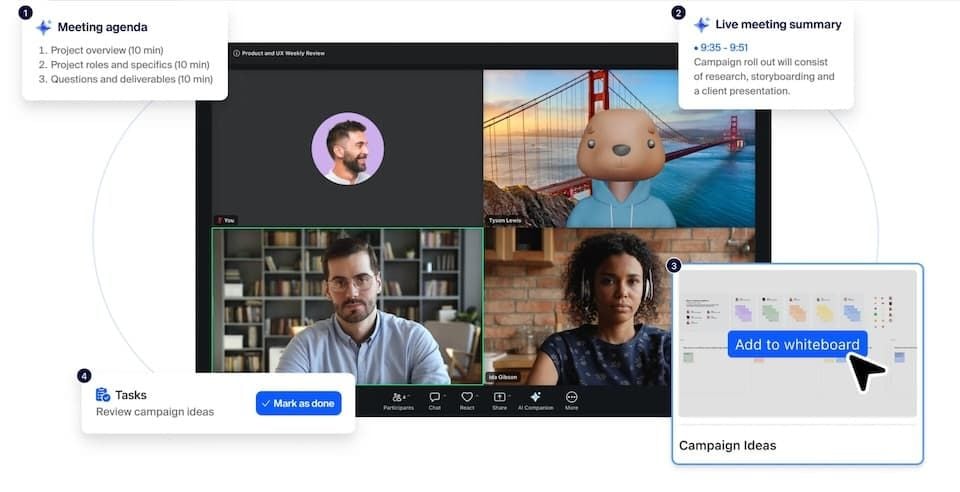
Businesses now require a more sophisticated video solution than a video meeting. What they require is a space where they can communicate, collaborate, schedule and work productively, all in a single system. Named Zoom Workplace, the solution combines meetings, team chat, phone services, calendars, documents, whiteboards, and AI-powered assistance to fulfill those needs. No matter if you're working from a remote location, a hybrid workplace, or a traditional workplace, Zoom Workplace can help you manage your everyday workflow to limit the number of apps you have to switch between.


What Is Zoom Workplace?
Developed by the creators of Zoom Meetings, Zoom Workplace is an AI-driven collaboration platform. Unlike with video conferencing, the platform offers a range of features for communication and productivity as well, all on a single workspace. Users can now view meetings, team chat, mail, calendar functionality, documents, whiteboards and phone services all in one application. This in-integrated approach will make it easier for teams to be engaged and manage projects effectively.
AI Companion Enhances Productivity
One of the standout features of Zoom Workplace is the AI Companion it has embedded within it. The assistant may also summarize meetings, add actions, answer queries in meetings and assist users to join in any meeting conversation they might miss. Participants do not have to shoulder the burden of taking notes; they can concentrate on what they are discussing with the AI technology recording key points.
AI Companion can also help create your chat messages, summarize long conversations, and help you with content creation. These capabilities save administrative grunt work and enable teams to focus on more meaningful work.
Video Meetings and Team Communication
Video conferencing continues to be an essential tool in Zoom Workplace. All users can enable virtual meetings with high quality audio and video, webinars, training sessions, collaborative discussion. Screen sharing, annotating, breakout rooms and meeting recordings are useful provisions to make sessions more engaging and productive.
In addition to meetings, Zoom Team Chat creates callable team channels for teams to communicate, share files and keep discussions going before and after meetings. This will also keep the important information easily available and help in maintaining the continuity of the project.
Collaboration Through Whiteboards and Documents
Zoom Workplace features integrated collaboration features that enable brainstorming, planning, and project management. Zoom Whiteboard is a collaborative virtual whiteboard that allows participants to draw diagrams, structure thoughts and ideas, and work together in real time. It allows the creation of sticky notes, presentations, mind maps, flowcharts and more.
In addition to that, AI Companion can automatically organize and generate content, and create a summary of the whiteboard. This can assist the team to transition the brainstorming sessions into actionable plans and activities.
Scheduling and Workflow Management
One of the largest professions challenges is managing the schedules. To solve this Zoom Workplace embeds calendar and scheduling features with this platform. Users can easily link external calendars, schedule a meeting, handle invitations and join a call.
It also stores everything like recordings, meeting notes, documents and collaboration documents at the center, making it easier to find information and keep everything well organized.
Security and Privacy Features
Security is a key concern for businesses that leverage collaboration. Zoom Workplace facilitates encrypted interactions, delivers administration controls to support information and also help handle meetings and secure delicate data. Users may also set-up access controls and privacy settings based on their organizational needs.
Although organisations are always encouraged to continue to follow their own security policy and best practice, Zoom Workplace has a number of measures in place to help facilitate secure communication and collaboration.
Who Should Use Zoom Workplace?
Zoom Workplace supports remote teams, hybrid teams, and education, consultants, project managers, and large companies. It offers native meetings, messaging, collaboration tools, and AI-powered productivity features, making it particularly advantageous for virtual-heavy teams.
Final Thoughts
Zoom Workplace is no longer just a video conferencing platform. It integrates with meetings, team communication, scheduling, document collaboration, whiteboards and AI assistance in one place, making it a complete solution for today's workplace. If you are an individual or organisation looking to create a more connected and productive digital workplace, Zoom Workplace offers you powerful tools that can make the collaboration and daily operations easier and more efficient.