












Description
DuckDuckGo Private Browser is a privacy-focused web browser created by the private internet search engine DuckDuckGo Inc, which offers users better protection in their online activity. Launched initially for Android and iOS in 2018, desktop support (macOS & Windows) followed at the end of 2022. Available platforms: Android, iOS, macOS & Windows.
Instead of using invasive tracking practices as the mainstream browsers like Google Chrome used to do (collecting and storing user data so they can use this knowledge for better-targeted ads), DuckDuckGo Private Browser was created around one philosophy: "We don't track you, we help you not be tracked by other companies." The key browser function uses operating system-provided WebView, thus runs on Blink (Android/Windows) and WebKit (iOS/macOS). The app can be freely downloaded and used, while a significant portion of the code (for Android as well as iOS) is shared under an Apache-2. 0 open-source license.
Features
1. Private Search by Default: Duck Duck Go does not track your search queries like the way Google is tracking, they do not record you IP address, browser cookies or use user agent! This avoids "search leakage", which refers to your individual information being sent over to the sites you are visiting.
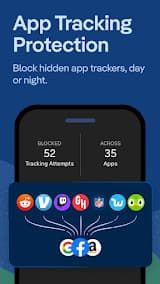
2. Tracker Blocking: With 3rd-Party Tracker Loading Protection, hidden tracking scripts can be stopped from loading altogether—so it uses some of the best technology available. This is beyond most common browsers' default behavior.
3. Smarter Encryption: Duckduckgo will, thus far on the unsecured HTTP connection to HTTPS when it is possible and uses his technology called "Smarter Encryption". It helps protect your data from Wi-Fi snoops and network sniffers, such as your Internet service provider.
4. Duck Player (Private YouTube Viewing): Duck Player will not affect your YouTube recommendations or ad profile for videos watched in Duck player. This applies YouTube's most strict privacy-enhanced mode to embedded videos.
5. Cookie Consent Management: It helps you silently manage cookie pop-ups by choosing the most private option possible by default. It automatically opts you out of tracking cookies, so that annoying pop-up doesn't even show up.
Review
Unlike virtually every other mainstream browser, which follows you around collecting and tracking the information from your searches, browsing history (where you've been on the web) -- not to mention location in most cases -- DuckDuckGo actually weaves protection into each layer of that experience.
The browser comes with a built-in third-party tracker blocker that blocks hidden trackers from loading, significantly accelerating page load times on many sites. DuckDuckGo, which is integrated into the app by default, does not track your search history or build profiles of users for targeted ads from relevant results. That’s not the only feature–the Fire Button is actually one of its coolest ones—one tap wipes all tabs and browsing data, so you can hit reset anytime on a whim.
Then it has Email Protection, which is another really useful feature. It generates unique @duck.com which are basically disposable addresses that will forward to you real inbox, and remove trackers from anything incoming. For password management, the built-in secure generator and storage offered by your browser decreases separate apps.
It features a clean and minimal interface which is somewhat easy to navigate. There will be very few clutter here or there as well. Basic tab management, the browser comes with bookmarks and dark line mode in a basic way. But it does not have advanced customization and extension support like that of Chrome or Firefox
Great privacy features aside, power users might miss the myriad of extensive extension libraries found in other browsers and developer tools. You may come across a few minor rendering quirks on sites designed for Chrome, but this is both rare and typically not an issue.
DuckDuckGo Private Browser is one of the browsers you can use without knowing much about using a VPN. This has with significant improvements in Android Security and It is especially good for daily browsing, research as well as users who are fed up of invasive tracking.

