




Description
Apple Music is a music and video streaming service developed by Apple Inc., that was launched on June 30, 2015. Announced on June 8, 2015 at the Worldwide Developers Conference (WWDC), it was later released in over a hundred countries and territories. It had evolved from Apple buying Beats Music back in 2014. Apple Music is accessible in 168 countries and regions around the world, supporting iOS, iPadOS, macOS watch OS tv-Os Android Windows PlayStation series / X / S/Xbox/smart devices. Apple Music has cemented itself as one of the premier music streaming services in the world, thanks to a whole host of factors including high-resolution audio formats, vast catalog breadth, smart recommendations and excellent support for both the Apple ecosystem.
Features
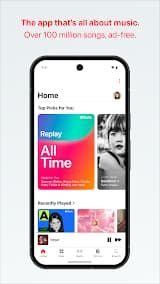
1. Extensive Music Library: Early years of Apple Music more than 100 million songs, and thousands of playlists curated by programmers or editorial staff who are assigned to this task. And the platform has a gigantic catalog covering every genre and era.
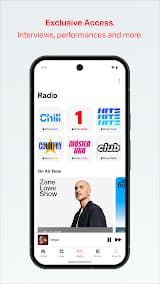
2. Live Radio Stations: Apple Music operates several 24/7 live radio stations, including Apple Music 1 (formerly Beats 1), Apple Music Hits, Apple Music Country, and others. These stations feature exclusive artist interviews, premieres, and curated programming hosted by renowned personalities like Zane Lowe.
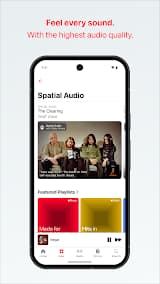
3. Spatial Audio with Dolby Atmos: An immersive spatial audio experience with Dolby Atmos Technology. This creates an immersive 3D soundfield that surrounds the listener, with head tracking support when aided by compatible AirPods or Beats headphones.
4. Personalized Recommendations: It uses advanced algorithms that analyse listening history and preference to provide personalized music recommendations. Curated suggestions are featured in the "Listen Now" tab, whilst thousands of playlists spanning many genres and moods curated by professional editors.
5. Apple Music Sing: Apple Music Sing, which allows users to sing along with their favorite tracks using adjustable vocal levels as well as synchronized lyrics are set in real-time over the music. This karaoke-style feature improves the overall listening experience of a song.
Review
Apple Music is, without a doubt, the cleanest music app. No comments section. No in-app store. No pop-up ads. Just music.
The interface is stunning. The playback screen adapts its background color from the album artwork, lyrics fade in and out with a beautiful motion blur, and the dynamic album covers cover the entire status bar — it feels seamless, not gimmicky. Apple's design DNA is everywhere, and it shows.
Lossless Audio & Spatial Audio are real game-changers. If you listen to the same track on Spotify and Apple Music side by side. The difference in clarity is unmistakable. Spatial Audio makes you feel like you're sitting in the front row of a concert.
The "For You" recommendations are eerily accurate. Unlike other services that throw everything at the wall, Apple Music's curated playlists — especially those hand-picked by music editors — actually understand what I want to hear next. This is the service's biggest competitive moat.
The album-first logic is both a strength and a weakness. Apple Music treats albums as the primary unit, not individual songs. Adding a single track to your library requires extra taps, and you can't batch-add songs — you do them one by one. If you're migrating from Spotify with a 2,000-song playlist, prepare for a painful manual process. There's no playlist import from other services.
Apple Music is the most respectful music app on the market. It treats music as an art form, not an ad platform. The $10/month price tag is justified by the audio quality, the absence of ads, and the depth of curation. Just be ready to relearn how you organize music.

 Install Latest APK

 Check historical versions